I Built a Cloud Storage Service with AWS Serverless
Introduction
I wanted a personal file sharing system, so I built a file storage service using only AWS serverless services.
In this article, I'll walk through the key design decisions and the actual architecture I ended up with.
What I Built
The cloud storage service that lets you upload, download, and manage folders through a web browser.
Key Features
- File upload / download
- Folder creation and hierarchical management
- Bulk ZIP download of multiple files / folders
- User authentication (sign-up, login, password reset)
- User profile management
Architecture
Here's the architecture diagram.
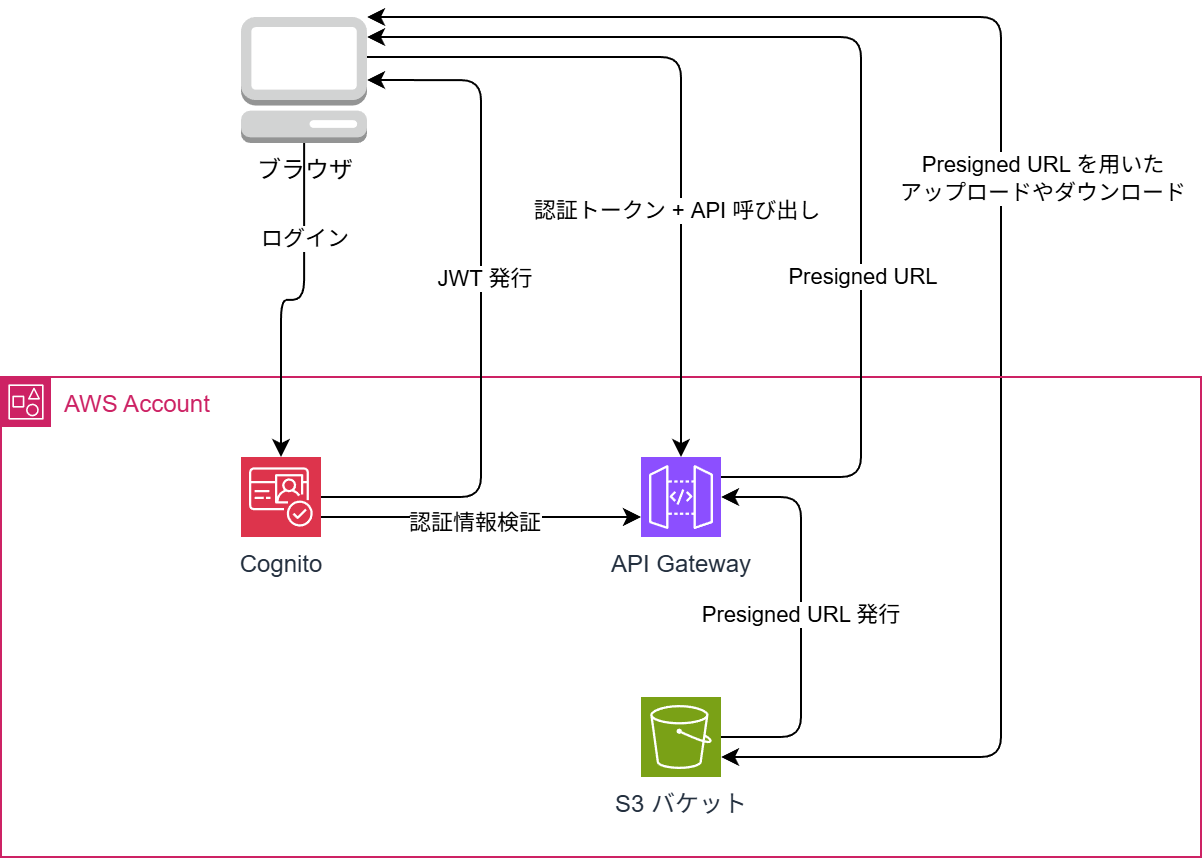
Most of the authentication is handled by Cognito. For file transfers, Lambda issues S3 Presigned URLs so the client communicates directly with S3.
Tech Stack
| Layer | Technology |
|---|---|
| Backend | C# (.NET 8) / AWS Lambda |
| Authentication | Amazon Cognito + Managed Login v2 |
| API | API Gateway (REST) + Cognito Authorizer |
| Storage | Amazon S3 |
Design Decisions and Reasoning
Using Cognito for Authentication
I leveraged Cognito's OAuth 2.0 endpoints and Managed Login to implement authentication.
In the end, I only needed a single Lambda function for auth: TokenFunction.
In terms of both functionality and security, less code is better. There's no need to write what AWS services already do for you.
File Transfers via Presigned URLs
Routing file uploads and downloads through Lambda introduces several problems:
- Hitting Lambda's payload size limit
- Loading large files into Lambda memory is costly
- Transfer time counts against Lambda execution time
With Presigned URLs, Lambda only issues the URL — the actual file transfer happens directly between the browser and S3.
Lambda execution time stays in the tens of milliseconds, and the file size limit extends all the way to S3's own limits.
Upload flow:
1. Browser → Lambda: "I want to upload file.pdf! Send me an upload URL."
2. Lambda → Browser: "Here's a Presigned URL. PUT your file here."
3. Browser → S3: "Sending PUT to S3."
4. Browser → Lambda: "Upload complete!"
ZIP Download for Folders
S3 doesn't have a built-in feature to download an entire folder.
For bulk downloads, I generate a ZIP file in Lambda, temporarily store it in S3, and return a Presigned URL for it.
The temporary ZIP file is automatically deleted after 1 day via an S3 lifecycle rule, so there's no garbage buildup.
Security
| Measure | Implementation |
|---|---|
| Brute-force protection | Cognito's built-in lockout (5 failures: 15-minute lock) |
| API protection | JWT verification via Cognito Authorizer |
| CORS | AllowedOrigin restricted to a specific domain |
| Temporary file management | S3 lifecycle rule auto-deletes files after 1 day |
Cost
With a serverless architecture, costs are nearly zero when not in use.
- Cognito: ESSENTIALS Tier is free up to 10,000 MAU
- Lambda: Free up to 1 million requests per month
- S3: Pay-as-you-go based on storage used (~$0.025/GB per month)
- API Gateway: $3.50 per 1 million requests
For personal use, monthly costs should land somewhere between a few cents and a couple of dollars.
Infrastructure as Code
The entire infrastructure is defined in a single template.yaml (AWS SAM).
Cognito User Pool, API Gateway, 3 Lambda functions, S3 bucket, CloudWatch alarms, SNS — all resources defined in roughly 600 lines of YAML.
Loading...